Reference · Print

Pathology labletterhead.

The letterhead is the only part of a report a patient recognises before they read a word of it. This is what belongs in the header and the footer, and how to decide between pre-printed stationery and printing it from the software.

Registration and accreditation requirements differ by state and by whether you are accredited. Check the rules you are registered under before you finalise a design.

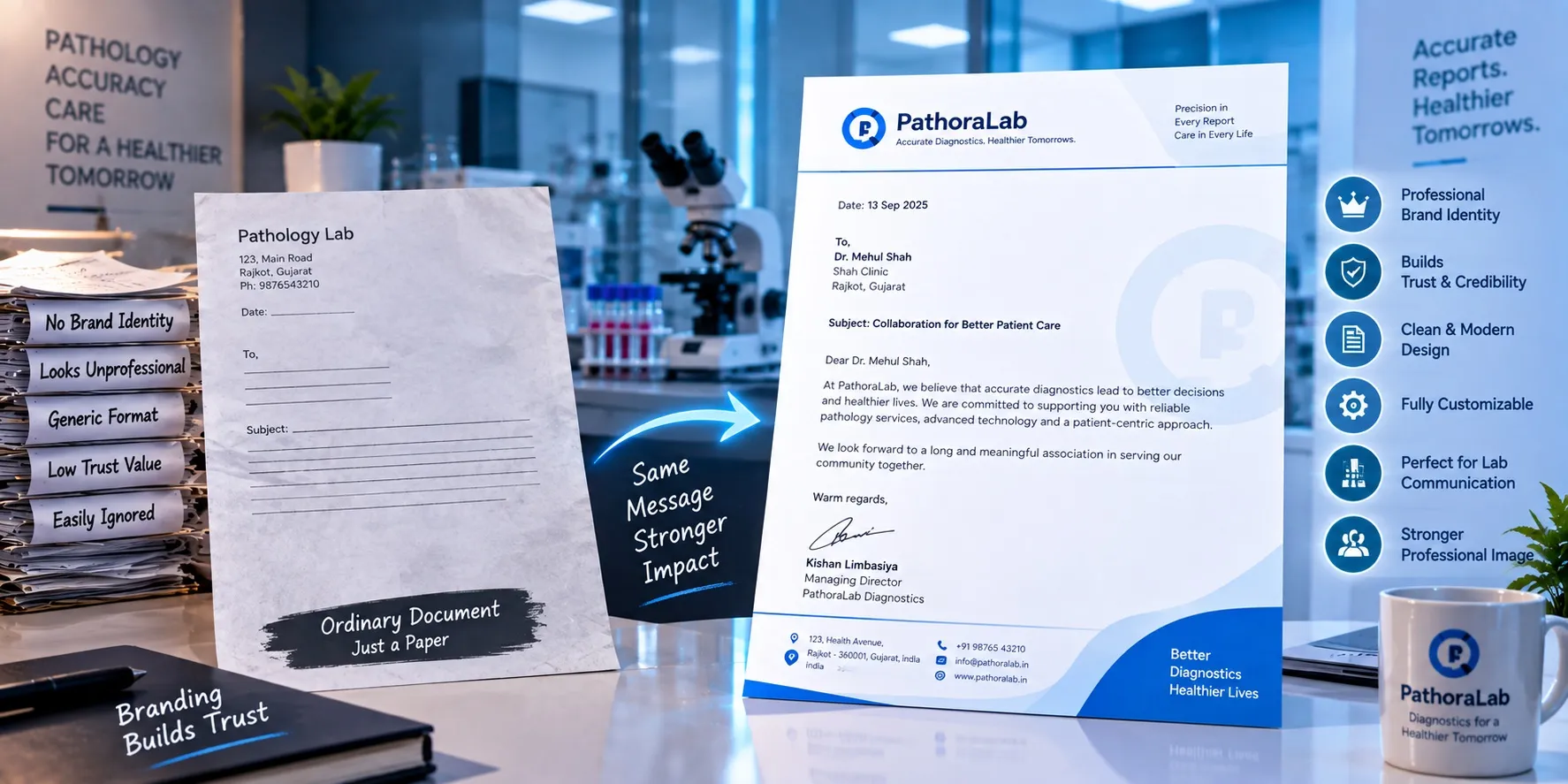
A plain, unbranded lab letter next to a PathoraLab letterhead with logo, tagline, signature block and footer — same message, stronger impact

The page, top to bottom

A letterhead is a header, a body it must stay out of, and a footer.

Most letterhead problems are not design problems. They are the header and footer quietly eating the space the result needed.

Your Laboratory

Branch address · Phone · WhatsApp · Email

Reg. No. · Accreditation No. (within scope)

Header
Printable zone — the report goes here

Dr. Pathologist Name

MD (Pathology) · Reg. No. · Signature

— End of report — · Page 1 of 1

Footer
The zone in the middle is the number that matters. Measure it on the real stationery, in millimetres, and set the template to it.

In the header

Lab name and logo
The registered name, spelled the way it appears on your registration. A trading name that differs from the registered one causes trouble at exactly the wrong moment.
Full postal address
Of the branch that produced the report, not only of head office. A patient who needs to come back needs the right building.
Phone and WhatsApp number
The number a patient or a referring doctor should actually call — not a landline nobody answers after six.
Email and website
One line, small. This is where a report-verification URL lives if you have one.
Registration number
Your clinical establishment or state registration, where your state requires it. Requirements differ by state — check what applies to you.
Accreditation mark and number
NABL or other accreditation, with the certificate number and the scope it covers. Never display a mark for a scope you are not accredited for.
Pathologist in charge
Name, qualification and registration number. Some labs put this in the header, most put it in the signature block — but it belongs on the page.

In the footer

Signature block
Verified-by name, qualification, registration number, and a signature — digital or scanned. This is the part that turns a printout into a report.
End-of-report marker
'— End of report —' so a page that got separated is obviously incomplete.
Page numbering
'Page 1 of 3', on every page. A report delivered on WhatsApp gets scrolled, screenshotted and forwarded page by page.
Verification QR or report ID
A code that resolves to the report, so a doctor receiving a forwarded PDF can confirm it came from you and has not been edited.
Branch list
Where you run collection centres. Small type, one line — it is quiet advertising that also helps a patient find the nearest counter.
Disclaimer
Short, and about the test: results relate to the sample received, and need clinical correlation. Not a paragraph disowning the result.

The decisions

Six things to settle before the design goes to print.

Avoidable

Letterhead mistakes that reach a thousand patients before anyone notices.

  • A logo saved at screen resolution, printed at 300 dpi — fine on the monitor, fuzzy on the page.
  • An accreditation mark left on the letterhead after the certificate lapsed, or shown for tests outside the accredited scope.
  • Head-office address on a branch's reports, so patients return to the wrong building.
  • A header so tall that a three-line result report runs onto a second page.
  • A phone number that changed two years ago, still printed on stationery nobody wants to waste.
  • A signature image at low contrast that disappears entirely when the report is faxed.

If you want this set up

Your letterhead, configured before you go live.

Margins measured to your pre-printed stationery, or the whole letterhead printed by the software so print, PDF and WhatsApp are one document — and each branch carrying its own address on the same layout. It is part of onboarding, not an add-on.

Questions, answered

Lab letterhead — common questions

What should be on a pathology lab letterhead?

In the header: the registered lab name and logo, the full address of the branch issuing the report, phone and WhatsApp, email, your registration number where your state requires one, and your accreditation mark and number if you hold one. In the footer: the verifying pathologist's name, qualification, registration number and signature, an end-of-report marker, page numbering, a verification QR or report ID, and a short disclaimer.

Is a registration number mandatory on a lab report?

It depends where you are registered. Clinical establishment registration is a state subject in India and the requirements differ from state to state, as do the rules for accredited labs. Check what applies to your registration — and where a number is required, put it in the letterhead rather than typing it into each report.

Should we use pre-printed letterhead or print it from the software?

Printing it from the software is the practical default now, because most reports are delivered as PDFs on WhatsApp and email where pre-printed stationery does nothing. Software-printed also means a changed phone number or a new branch is a template edit rather than a new stationery run. Many labs keep pre-printed stock for counter copies and use the software design everywhere else.

Can the NABL logo go on our letterhead?

Only if you hold the accreditation, and only within the scope it covers. Displaying an accreditation mark you do not hold, or applying it to tests outside your accredited scope, is a serious problem at assessment. If part of your menu is accredited and part is not, make sure the report makes that distinction rather than the letterhead implying blanket coverage.

What margins should a lab report template use with pre-printed stationery?

Measure the clear printable zone on the actual stationery in millimetres and set the template to it — then print a real page on the real paper and check the signature block and footer do not collide with what is already printed there. Do this before the template goes into daily use, not after.

Should each branch have its own letterhead?

Each branch needs its own address and phone on the report it issues, but the design should be identical across branches. Same layout, same logo, same typography, only the address block changes — so every report still reads as one laboratory.

Does Pathora print on our existing letterhead?

Yes. Letterhead and report templates are configured with you during onboarding — margins set for your pre-printed stationery if you use it, or the full letterhead printed by the software if you would rather have one design across print, PDF and WhatsApp. Each branch gets its own address block on the same layout.

Ready when you are

See Pathora.
See the difference.

Book a quick 30-minute walkthrough and see how Pathora turns complex laboratory workflows into one simple experience.

Or talk to our team
  • Free for 1 monthGet started without pressure
  • Data importedWe help you move everything
  • No new hardwareWorks with your setup